

Loan Covenants and How They Appear
Defining a Loan Covenant
The first step in identifying the loan covenants is understanding what they are. A loan covenant is a mutual agreement between the lender and the borrower on what standards must be maintained by both parties. Examples of loan covenants are:
- Debt Coverage Ratio
- Occupancy
- Loan to Cost
- Loan to Value
Your loan documents will spell out the specific agreements around any and all metrics you agreed to.
How to Track Loan Covenants in STRATAFOLIO
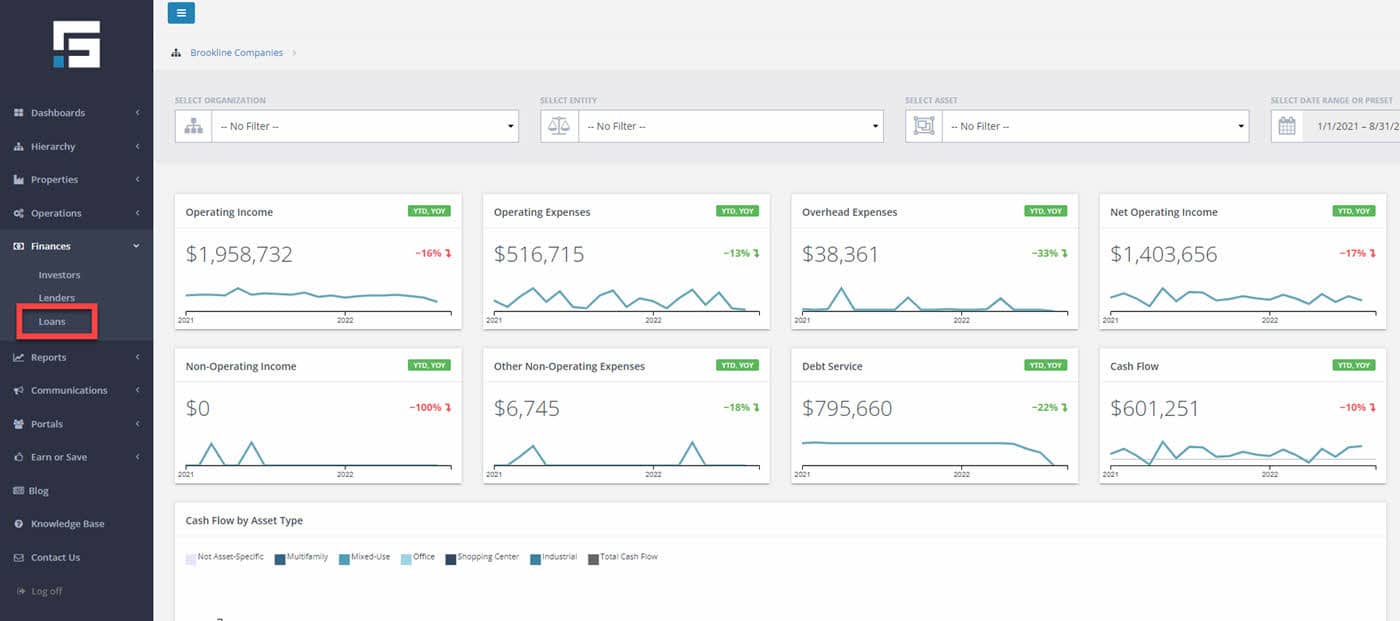
When tracking the loan covenants, the first step is to navigate to the Finance tab on the left-hand navigation. Once the Finance tab is open select the Loan button. After doing that, it will take you to the Loan Dashboard.
Now that you are on the Loan Dashboard you will find that all the loan information that has been added to STRATAFOLIO is organized and can be easily identified. Highlighted below are all of the Loan Covenants recorded in STRATAFOLIO.
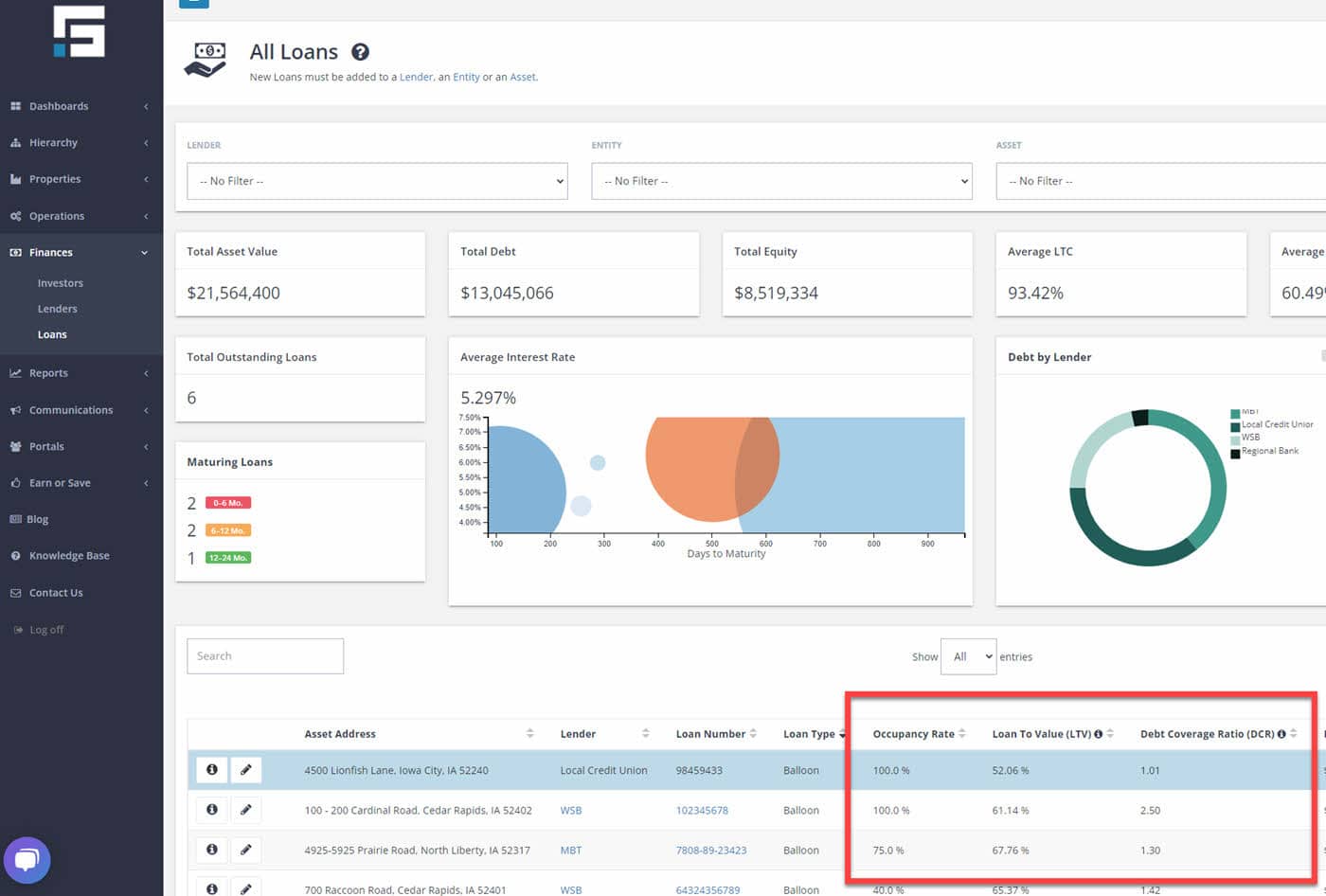
In conclusion, keeping track of your loan information in STRATAFOLIO is crucial, as it will give you an excellent way to monitor your loan covenants over time.
STRATAFOLIO tracks loans to give you an up-to-date look at the organization’s entire portfolio. STRATAFOLIO connects the QuickBooks Liability accounts to the Loans. This shows the current analytics in the Loan Dashboard. When you enter a loan in STRATAFOLIO, you must connect it to the account in the QuickBooks Chart of Accounts (COA) where you are recording the loan. Mapping the QuickBooks loan account to the loan input in STRATAFOLIO will (upon sync and QuickBooks updates) update the current balance in STRATAFOLIO.
Mapping Chart of Accounts in STRATFOLIO
Map the Chart of Accounts for each of the integrations before starting with the loans. For more information on how to map the COA, please refer to:
How to Map a New Account in STRATAFOLIO That Was Created in QuickBooks.
Mapping Loans
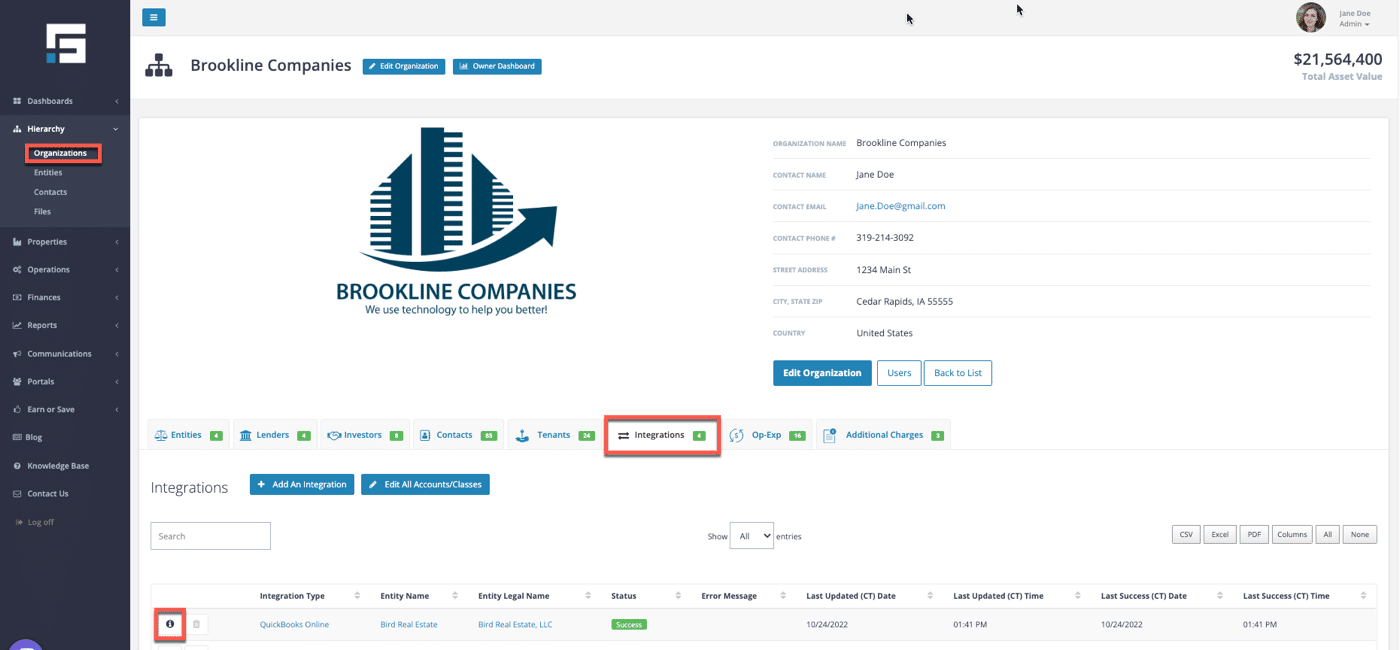
On the main Organization page, select the Integration tab. This tab contains a list of loans that are linked to QuickBooks accounts. Navigate to the Integration “i” button corresponding to the QuickBooks file that contains the loans to be updated.
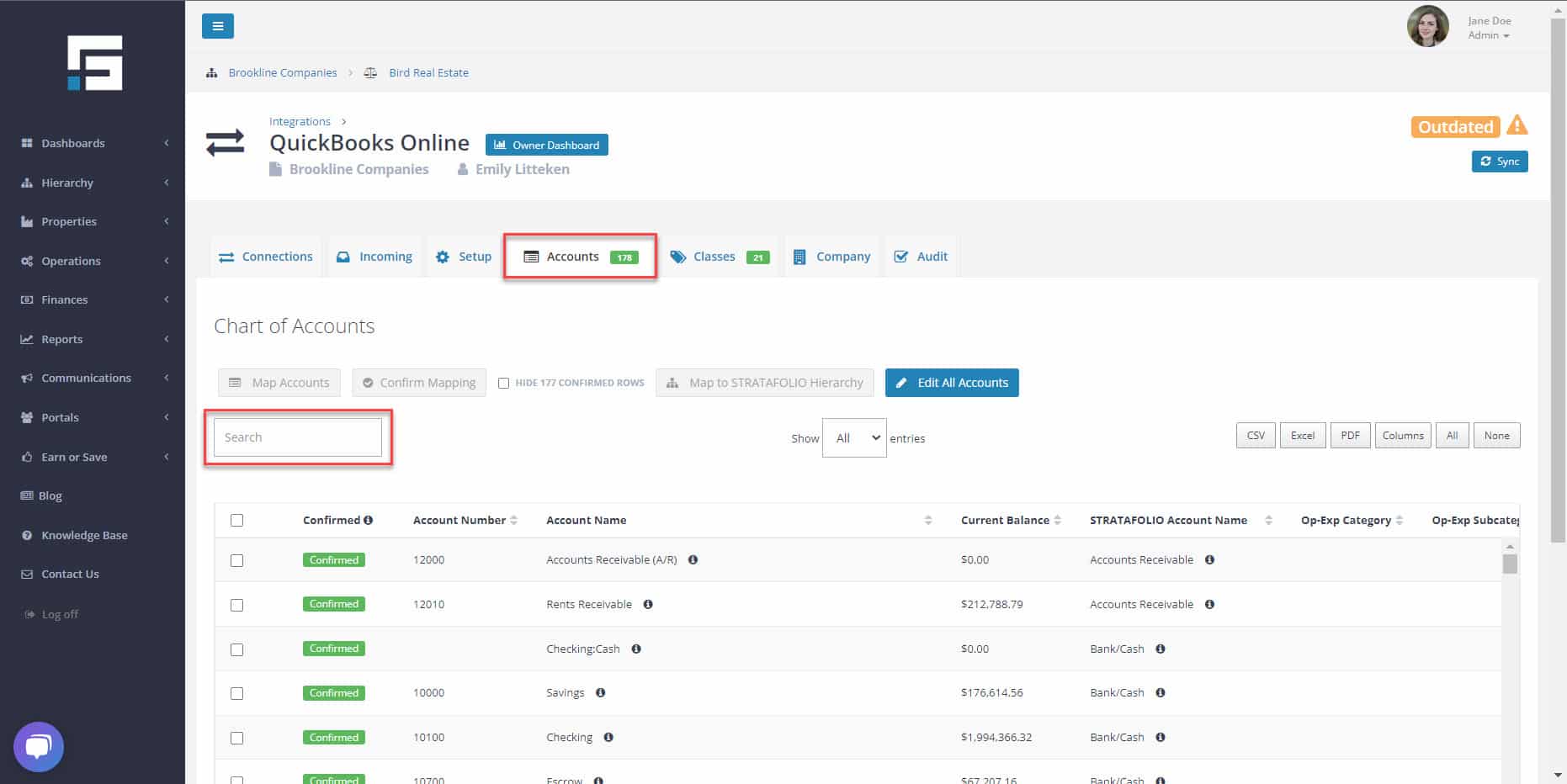
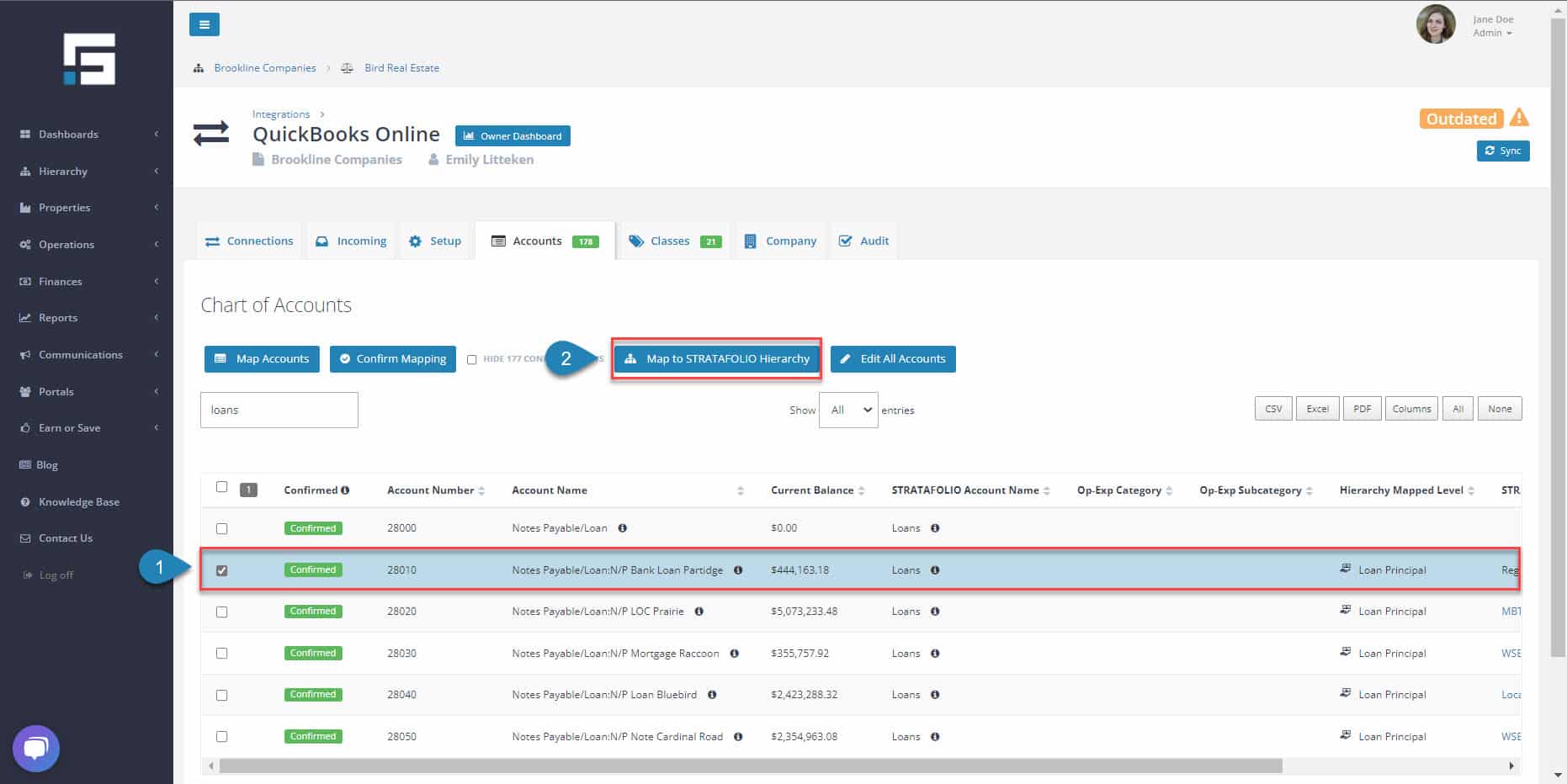
First, navigate to the Accounts tab. Begin typing the account name from QuickBooks into the Search field to find the proper account in the COA.
Now, select the checkbox next to the correct loan account. Next, choose the Map to STRATAFOLIO Hierarchy button.
Next, select Loan Principal. The drop-down shows all the loans currently entered into STRATAFOLIO for this entity. Select the correct loan in STRATAFOLIO and select Save.
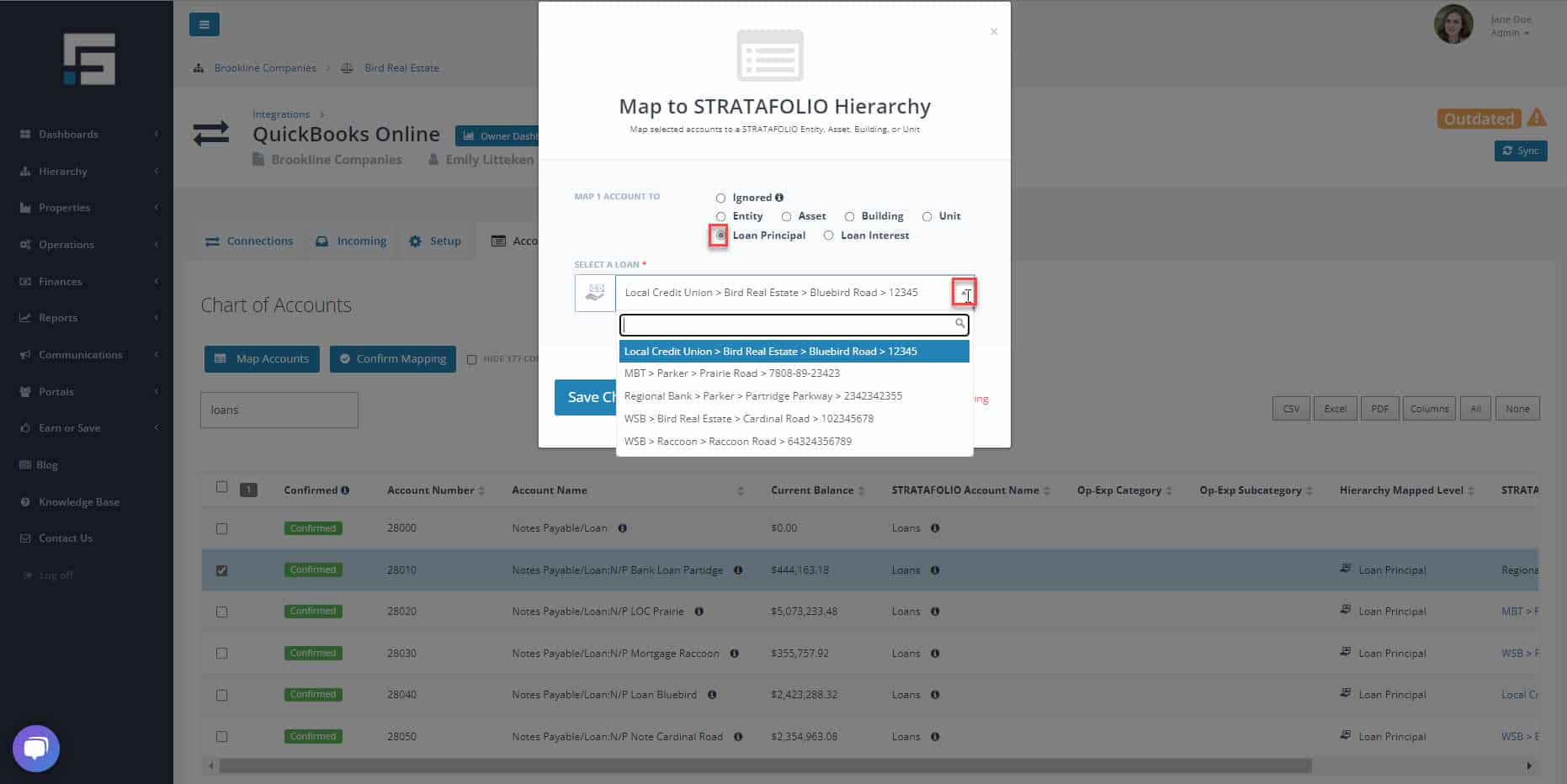
This finishes the Mapping process. Lastly, the inputted loan’s current balance will update when the QuickBooks account updates and syncs to STRATAFOLIO.
** Note: In order to maintain accurate analytics, it is important to follow best practices and update the loan balances and interest on a monthly basis. By doing so, you can ensure that your data is up-to-date and reflective of the current state of your loan portfolio. Additionally, keeping your analytics accurate can help you make informed decisions about how to manage your loans and ensure that you are on track to meet your financial goals.
How Do I Manage Loan Payment Adjustments?
While this process is common for seller-carried loans, the same steps apply to any loan with scheduled changes in payment amounts or interest rates. These changes may occur over time based on the terms of your financing agreement or amortization schedule.
STRATAFOLIO offers powerful tools for tracking and reporting loans, but it does not post loan payments or automatically apply payment adjustments in QuickBooks. Loan payments and adjustments must first be recorded in your QuickBooks account. Once updated there, the new balances will automatically sync to STRATAFOLIO.
To keep your loan data accurate, you’ll need to manually update the payment amount and effective date in STRATAFOLIO whenever a change occurs. This ensures your loan records, cash flow projections, and property-level financials stay current and correct.
The steps below will guide you through how to manage and record these updates.
Step 1: Review and Prepare Your Loan Payment Schedule
Before making updates in STRATAFOLIO:
- Review the terms of your loan agreement or amortization schedule.
- Identify when payments change, what the new amounts are, and the exact start dates.
- Upload a copy of your loan payment schedule or supporting document to the Files section in STRATAFOLIO for easy reference.
Example:
- Years 1–5: $4,333.33
- Years 6–10: $4,696.97
- Years 11–15 (interest 3.75%): $5,000.00
- Years 16–20 (interest 4.0%): $5,333.33
Having this information on hand makes updates faster and helps maintain consistency across your records.
Step 2: Locate and Open the Loan in STRATAFOLIO
- Log in to your STRATAFOLIO account.
- From the left-side navigation menu, navigate to Finances → Loans.
- Locate the property or entity associated with the loan you want to update.
- Seelct the loan name or the pencil icon to open the Loan Details page.
Here you’ll see all key fields such as principal balance, interest rate, amortization term, and current payment amount.
Step 3: Update the Payment Amount and Effective Date
When a new payment schedule period begins:
- Select Edit Loan on the Loan Details view.
- Enter the new payment amount that reflects your updated schedule.
- Update other related fields (such as interest rate) if applicable.
- Select Save Changes to confirm.
Note: STRATAFOLIO does not automatically recalculate interest or principal based on future changes.
Each new rate or payment period must be entered manually to maintain accuracy.
Step 4: Record a Note for Audit and Reference
To maintain a clear record:
- Use the Notes section in the loan record to document:
- The date the payment was adjusted
- The new payment amount
- A short description (e.g., “Year 11 rate adjustment per financing schedule at 3.75%”)
- The date the payment was adjusted
This creates an easy audit trail and helps future users understand the loan’s history without referencing outside documents.
Step 5: Set Reminders for Upcoming Adjustments
Since STRATAFOLIO does not yet automate recurring adjustments, set reminders using:
- Google Calendar or Outlook notifications
- Internal task lists or workflow software
Proactive reminders ensure you update your loan records on time and avoid discrepancies in financial reporting.
Summary and Best Practices
- STRATAFOLIO does not automatically adjust loan payments or interest rate changes.
- Always record loan payments and adjustments in QuickBooks first, then review the Loan Dashboard for updated balances.
- Manually update payment amounts in STRATAFOLIO when changes occur.
- Add Notes to document each adjustment and keep your loan history transparent.
- Upload supporting documents (loan schedules, rate change notices, etc.) to the Files section for reference.
- Use calendar reminders to ensure timely updates.
Maintaining accurate and current loan information in STRATAFOLIO helps keep your reports, dashboards, and portfolio analytics reliable.
