

What is ACH
The Automated Clearing House (ACH) is a secure electronic network in the United States that enables direct transfers of money between bank accounts. In this case, tenants can conveniently pay rent to their landlords without needing paper checks or manual transfers.
How ACH Payments Work in STRATAFOLIO
STRATAFOLIO offers ACH (electronic bank-to-bank payment options) for tenants and landlords. Partnering with STRATAFOLIO to receive payments from Tenants means less manual tracking, less time spent on tracking payments, and overall increased efficiency.
Upon setup, the initial ACH verification can take up to two weeks.
- STRATAFOLIO offers both one-time and monthly payment options, as well as autopay.
- Both parties must have online banking options at the bank they will be using.
- Tenants can only make payments if there is an invoice to link to them.
- Charges may apply for NSF or for reversal of transfers.
- Transactions are hassle-free, and the amount a tenant can pay depends on the account type.
- Standard account type: Allows payments up to $50K over any 30-day Period, including fees.
- Premium account type: Allows payments up to $100K per transaction, including fees.
- Transactions usually take 2 to 7 business days (excluding bank holidays), depending on the lending institution. Based on the lending institution, there are two transfer types.
- Expedited: If supported by the lending institutions, these transfers can take between 2 and 4 business days (excluding bank holidays) for the money to appear in your account.
- Regular: These transfers can take between 4 and 7 business days (excluding bank holidays) to appear in your account. If a tenant had to manually verify their account, their lending institution would most likely not support the expedited method.
What are the ACH Processing Times
There are two possible transfer types.
Expedited Transfers
Expedited transfers typically complete within 2 to 4 business days (excluding bank holidays). This faster processing is used when the property’s payment settings allow expedited transfers and the tenant’s bank account supports electronic balance confirmation.
Regular Transfers
Regular transfers usually complete within 4 to 7 business days (excluding bank holidays). These transfers may occur when faster processing is not supported by the connected bank account or when the property’s payment settings require regular processing.
Why Some Payments Are Processed as Regular Transfers
Even when expedited transfers are available, some payments may still be processed using regular ACH timing. This may occur if:
- The property’s payment settings are configured to use Regular transfers
- The bank account was connected using manual account numbers instead of an online banking login
- The system cannot confirm the account balance electronically
- The bank does not support faster ACH processing
In these situations, the system will automatically process the payment as a regular ACH transfer to ensure the payment can still be completed.
Account Verification (Micro-Deposits)
To securely connect a bank account for ACH payments, STRATAFOLIO uses a micro-deposit verification process. This process confirms that the bank account entered belongs to the user setting up ACH payments.
Here is how verification works:
- After you enter your bank account information, STRATAFOLIO sends two small deposits (micro-deposits) to the account you provided.
- These deposits typically appear in your bank account within a few business days.
- Once you receive them, return to STRATAFOLIO and enter the exact amounts of the two deposits.
- If the amounts match, your account will be successfully verified and activated for ACH payments.
IMPORTANT: Micro-deposits must be verified promptly. If the account is not verified within the allowed timeframe, the deposits may expire, and you will need to restart the verification process.
ACH Fees
The landlord can elect to pay the ACH convenience fee themselves or pass it along to the tenant. The cost is .05% with a $2.50 minimum per transaction.
ACH Requirements
Before ACH payments can be used in STRATAFOLIO, the following requirements must be met:
1. Online Banking Access
Both the owner (landlord) and tenant must have access to online banking with the financial institution they intend to use for ACH payments.
2. Bank Account Verification
Any bank account used for ACH payments must be verified using the micro-deposit verification process described above.
3. Active Invoice
Tenants can only make ACH payments after an invoice has been created by the owner or property manager.
4. Initial Setup Time
During the initial setup, ACH verification and approval may take up to two weeks, depending on bank processing and verification requirements.
Once these requirements are met, tenants can make one-time or recurring ACH payments through the STRATAFOLIO platform.
ACH Payment Limits by Account Types
You will have the option to set up your account as Standard or Premium, which will affect the payment limit for your ACH account.
Standard – This account type allows you to make payments of up to $50,000 (including applicable fees) over any 30-day period. During the set-up process, you must provide your First Name, Last Name, and Email Address to create this account type. Please note that to make payments exceeding $50,000 in any 30-day period, including fees, you will need to upgrade to our Premium plan. The good news is that there is no extra cost for this plan. It only requires you to provide a bit more information than the standard plan.
Premium – This account type allows you to make payments of up to $100,000 per transaction (including applicable fees). The required information varies based on the Business Type you have. Details are provided in the table below.
| Account Type | Max Payment Limit | Business Types | Information Required |
|---|---|---|---|
| Standard | $50,000 Over Any 30-Day Period | – | First Name, Last Name, and Email Address. |
| Premium | $100,000 Per Transaction | Personal | In addition to the information required for the Standard Customer Type, you will be required to provide Your Date of Birth and the Last 4 Digits of Your SSN. |
| Premium | $100,000 Per Transaction | Sole Proprietorship | In addition to what is required for a Premium Personal Account, you will be required to provide Your Business Name, Industry Classification, Business Location, and Business EIN. |
| Premium | $100,000 Per Transaction | Corporation, LLC, and Partnership | In addition to what is required for a Premium Sole Proprietorship account, you will need to provide information on the Account Admin, Controller, and Beneficial Owner. |
How to Check ACH Transfers
Monitoring Automated Clearing House (ACH) transfers is an important part of managing payments in STRATAFOLIO. Both administrators and tenants can review ACH activity directly in the platform to confirm successful transfers, check for pending items, or identify failed payments.
This article explains the two main ways to check ACH transfers: through the admin view and through the tenant portal.
Checking ACH Transfers as an Administrator
Administrators can see all ACH activity tied to their organization. To view transfers:
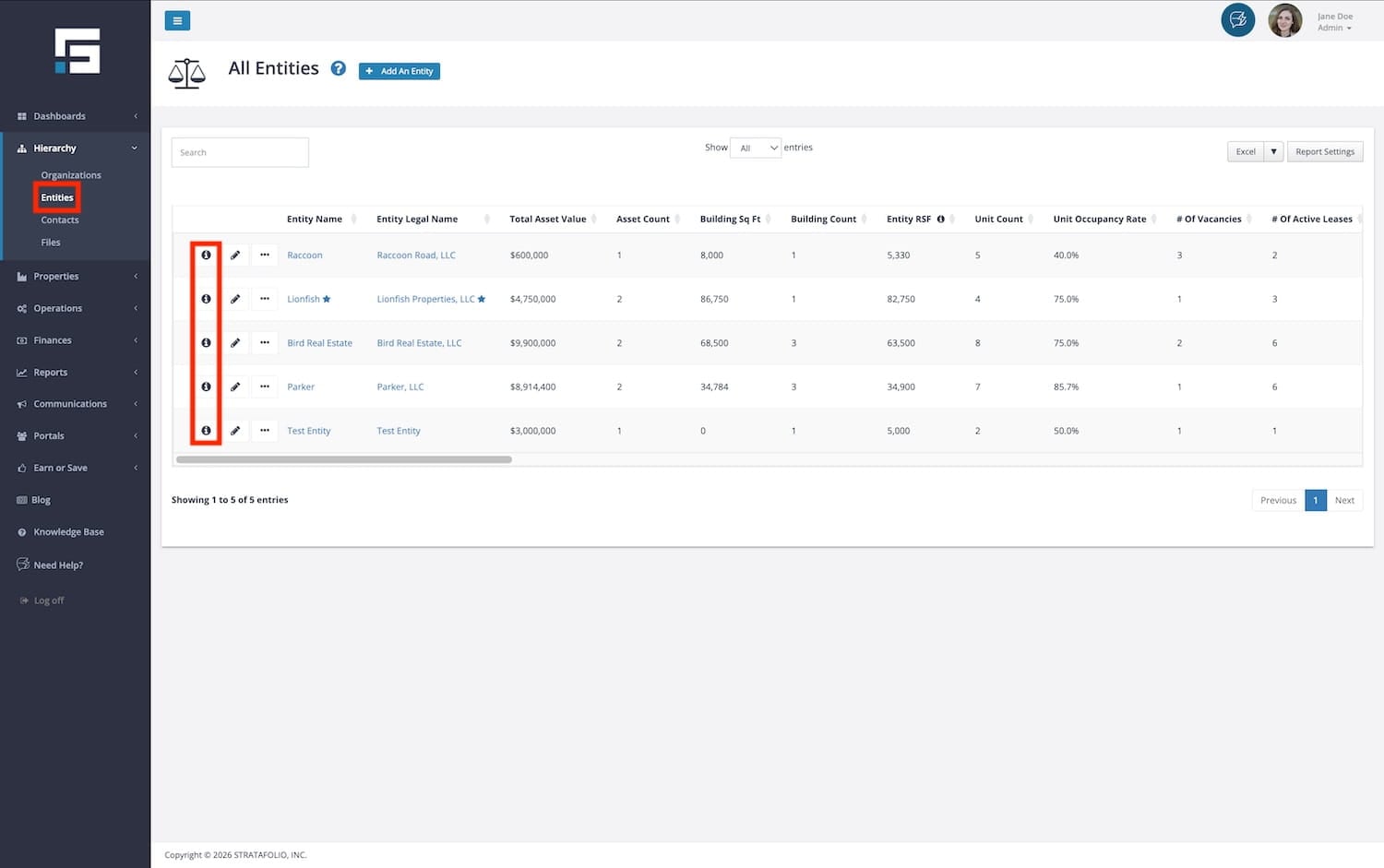
- From the left-side navigation menu, navigate to Hierarchy > Entities.
- Select the i (information) icon next to the Entity record.
- Open the ACH Integrations tab.
- Select the i icon next to the ACH integration you want to review.
- Select the Transfers tab.
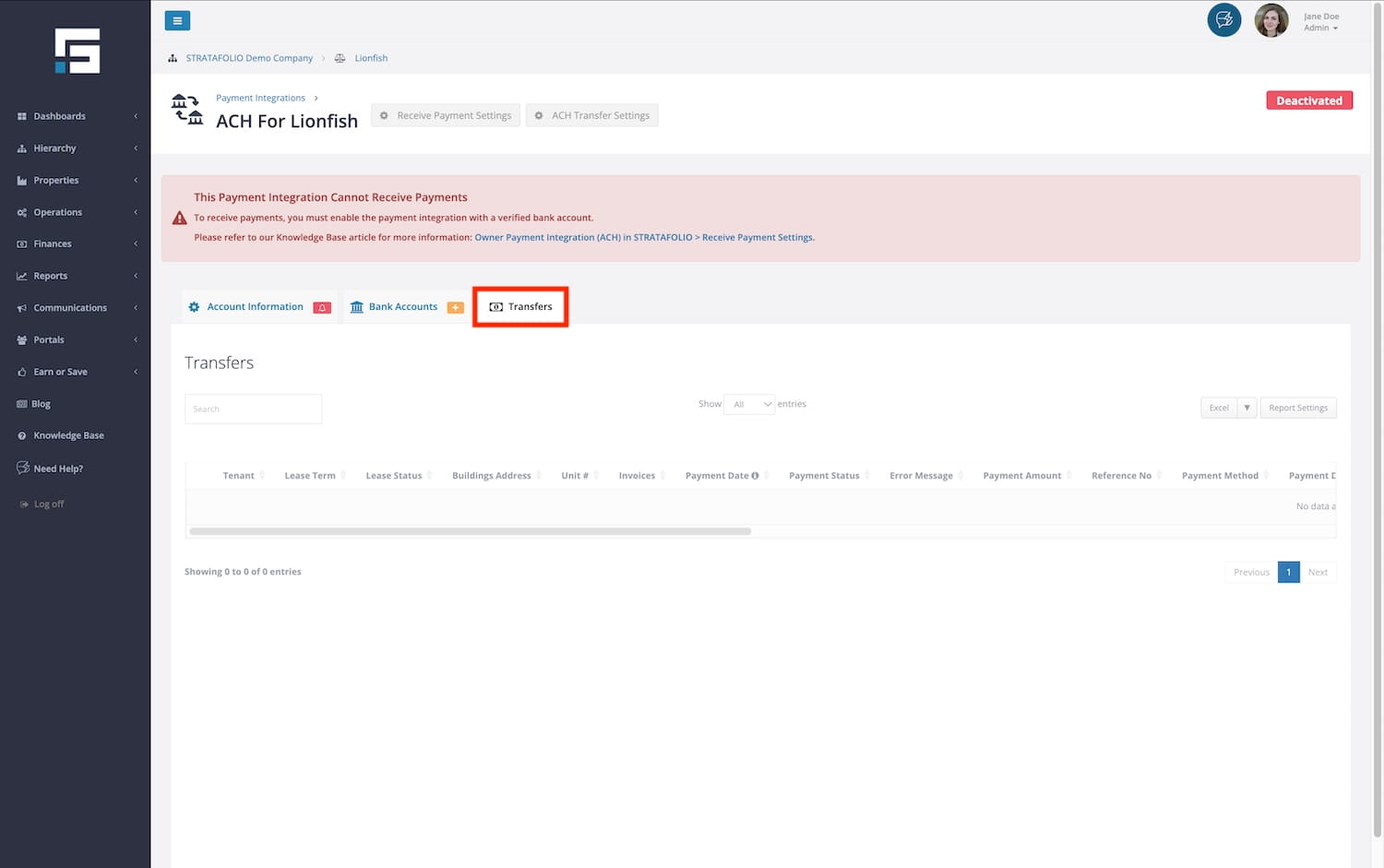
This will display all transfers associated with that integration, including details such as:
- Transfer date
- Status (Pending, Completed, Failed)
- Linked tenant or owner account
From here, you can quickly verify whether payments have cleared or if further action is needed.
Checking ACH Transfers in the Tenant Portal
Tenants can also monitor their own payments directly through the Tenant Portal.
- Log in to the Tenant Portal.
- Open the Payments tab.
- Review the list of payments, including ACH transfers, with their dates, amounts, and statuses.
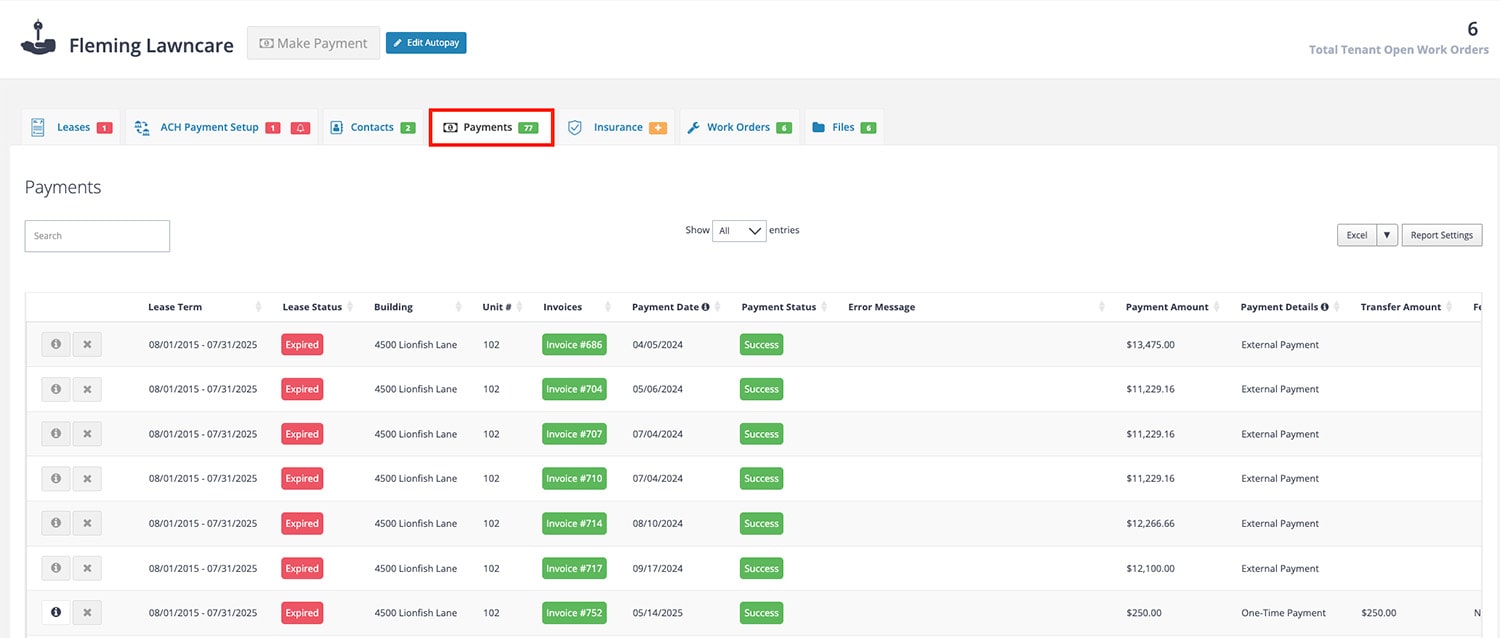
This gives tenants visibility into their payment history and confirmation of whether transfers were processed successfully.
Why Checking ACH Transfers Matters
Being able to view ACH transfers in real time provides transparency for both owners and tenants. It helps you:
- Confirm payments were received on time.
- Identify failed or returned transactions early.
- Improve communication between owners and tenants by ensuring both parties can see the same payment records.
Next Steps for Learning More About ACH
- To learn about ACH for ownership distributions, visit Owner Payment Integration (ACH) in STRATAFOLIO.
- To learn more about ACH for tenants, read ACH Payments for Tenants in STRATFOLIO.
- To learn about ACH error codes and how to handle them, read How to Handle ACH Error Codes.
Best Practices for using ACH
- Stop Autopay Promptly
- If you no longer plan to use STRATAFOLIO’s ACH, stop autopay immediately to prevent failed or partial payments.
- Confirm Payment Responsibilities
- When autopay is stopped, tenants are responsible for ensuring payments are made manually and on time.
- Use One-Time Payments for Flexibility
- If autopay doesn’t meet your needs (e.g., irregular invoice amounts), tenants can make one-time payments directly in the Tenant Portal.
- Communicate Changes with Tenants
- If you, as an owner or property manager, decide not to accept ACH payments in STRATAFOLIO, inform tenants so they can adjust their payment methods accordingly.
