
Income Items in QuickBooks allow you to separate the type of income you receive without creating multiple income accounts. When creating an Item, you also specify which Income Account it connects to. Essentially, you are creating sub-items under an Income Account. QuickBooks uses Income Items for invoicing and tracks them easily in its reporting.
At STRATAFOLIO, we highly recommend invoicing to track your tenants and their rental income. Using Income Items for each revenue type is a best practice for invoicing in QuickBooks Online. Also, you need Income Items to use the invoicing functions in STRATAFOLIO most effectively.
To better understand Income Items, read on to see how they are structured, how to add them to QuickBooks Online step by step, and how to use them in invoicing.
Typical Income Items
For Commercial Real Estate, the names can be whatever you feel best describes it. These are the typical Income Items that we recommend:
- Base Rent
- CAM (Common Area Maintenance) Income/Expense Recovery
- Insurance Income/Expense Recovery
- Real Estate Taxes Income/Recovery
Adding Income Items in QuickBooks Online
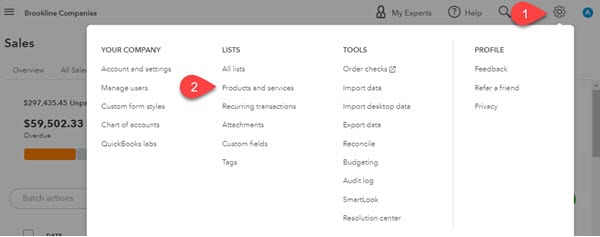
- To add an income item, select the gear icon in the top right corner, then select Products & Services under Lists.
- Next, click the green New button

- Select Service from the list. Most of the income items you use will fall under services for commercial real estate, since renting a building and common area maintenance are services you provide to your tenants.
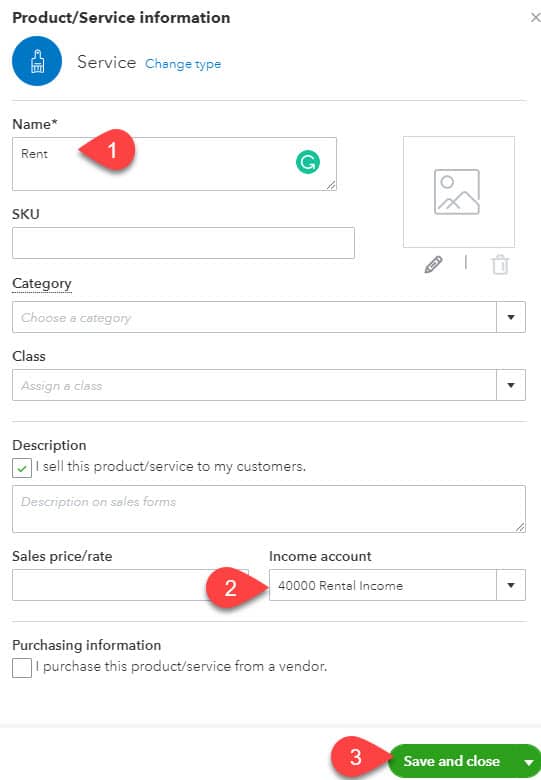
- Enter a Name for the Income Item, select the Income Account it will post to, then Save & Close.
Do NOT add a Class for your Income Item. You will add the Class when you create an invoice. This allows you to create fewer items and reduces confusion.

- Repeat this process for each Income item that needs to be added.
NOTE: As you see in the image above, you can add additional information when you create the Income Item, such as an SKU & Sales price/rate. We recommend leaving those fields blank because Rent & CAM rates vary from tenant to tenant and over time.
Using Income Items for Invoicing
Once you set up Income Items, you can use them to create invoices for your tenants.
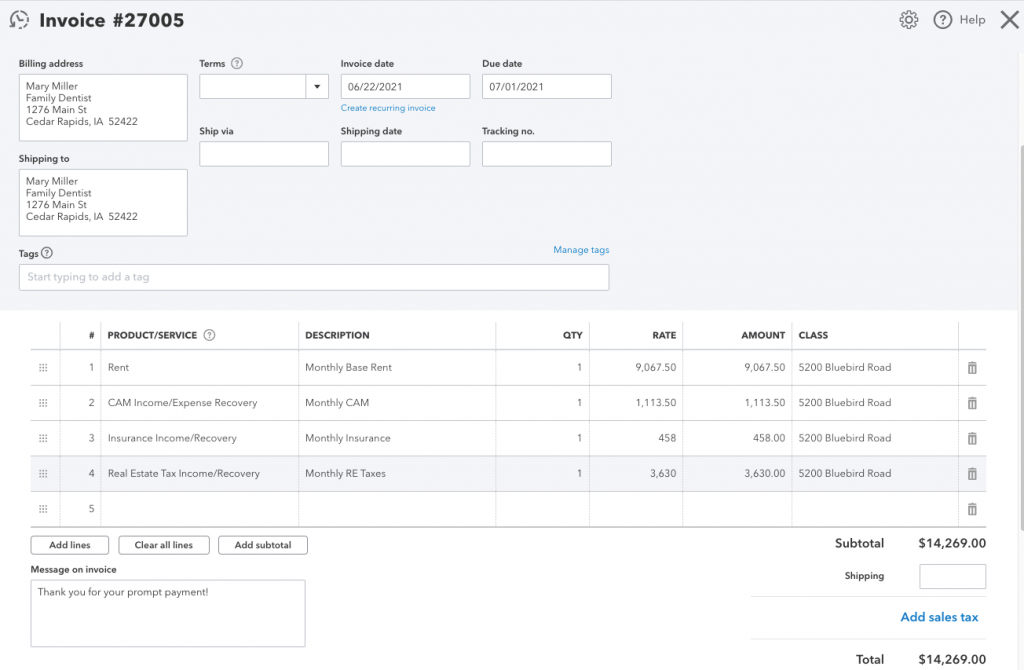
Notice that the Class is specified in the invoice. Selecting Class on the invoice, rather than setting it as part of the Income Item, allows a single Income Item to be used for multiple Classes.
Also, in the example above, four different Income Items are used. The last three, CAM, Insurance, and Property Taxes, are all posting to the same Income Account even though they are three separate items on the invoice. Having items separated but still linked to the same Income Account is especially helpful when running reports on these operating expenses in QuickBooks.
| Income Item | Income Account |
|---|---|
| Rent | 40000 Rental Income |
| CAM Income/Expense Recovery | 41000 CAM & Recovery Income |
| Insurance Income/Recovery | 41000 CAM & Recovery Income |
| Real Estate Taxes Income/Recovery | 41000 CAM & Recovery Income |
