IIn STRATAFOLIO, records must be managed carefully to keep your portfolio data accurate and complete. This guide explains STRATAFOLIO’s recommendation on deleting contact records, and the steps to follow if deletion is appropriate.
Why STRATAFOLIO Does Not Recommend Deleting Contacts
In most cases, you should not delete a contact record, even if that contact is no longer active.
Contact records serve as historical data for your portfolio. If you delete a contact, you also remove their history from STRATAFOLIO permanently. This can create problems later. For example, if a former contact still needs to access the Tenant Portal to review or confirm something from their time as a tenant, they will no longer be able to log in once their contact record has been deleted.
Instead of deleting a contact who is no longer active, leave the contact record in place. If the contact should no longer be able to log into the Tenant Portal, remove their login access instead of deleting the record. This preserves their history while ending their portal access.
When It Is Appropriate to Delete a Contact
STRATAFOLIO only recommends deleting a contact record when both of the following are true:
- The contact is a duplicate that was created by mistake.
- The duplicate contact has no tenant or lease records associated with it.
If a contact does not meet both conditions, do not delete it. Follow the steps below only for a duplicate contact that meets these conditions.
Get Started
To delete a contact, navigate to the Hierarchy section on the left-hand navigation panel.
Click on Contacts to view the list of contacts. Locate the contact you wish to delete and select the “i” icon to the left. Select the Edit option next to the contact’s name. Look for the Delete option and confirm the deletion.
If a record can be deleted, the Delete <Record> will be shown in red.

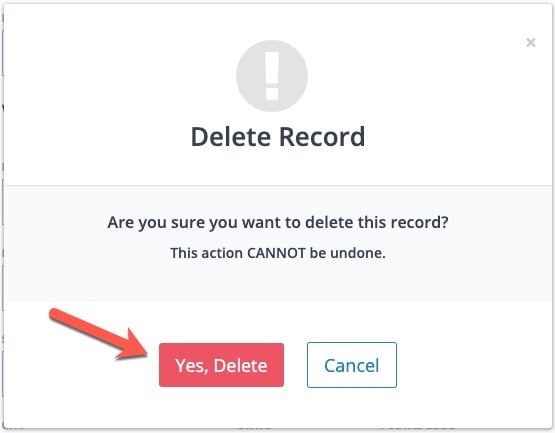
Once you click on the Delete <Record>, a pop-up will show asking for confirmation to make sure you really want to delete the record. Once you click the Yes, Delete button, your record will be permanently deleted.
Notes on Deleting Records
- Deleting a record is permanent and cannot be undone.
- Only users with the appropriate permissions can delete records.
- If a contact is linked to multiple tenants, you may not delete them.
- Other types of records (such as tenants, units, or assets) also require disassociating linked data before they can be deleted.
⚠️ Do not delete leases or assets. Keep leases for historical records and potential re-tenanting. For assets, mark them as Sold instead of deleting, so you preserve important historical and financial data.