STRATAFOLIO sends alerts so you never miss an important date or action across your portfolio. Alerts watch your leases, loans, insurance, operating expenses, tenant payments, and bank connections, then notify the right people by email before a problem can grow. This article explains the alerts that matter most to owners, investors, property managers, and tenants. You will learn what each alert means, who receives it, when STRATAFOLIO sends it, and how to act on it. It also includes a dedicated section on the Missing Operating Expense Period email alert and how to open the correct lease from the link inside that email.
Before You Begin
A few things make alerts work correctly, so review these first.
- You must turn on your global alert settings. STRATAFOLIO only sends the alerts you have enabled in your profile. If you are not receiving an alert you expected, the setting is the first place to check.
- Your access role decides which alerts you can receive. Most alerts go to the Admin, Manager, Property Manager, and Reader roles. Some go to tenants through the Tenant Portal. A tenant must have Tenant Portal access to receive and manage their own alerts. If a tenant does not have portal access, the landlord team still receives the related alerts.
- Some alerts depend on how a lease is set up. For example, the Missing Operating Expense Period alert only applies to a lease that is linked to your accounting integration. The Lease Expiration alert only sends when the alert is enabled on the individual lease.
Where to Find and Manage Your Alerts
You control which alerts you receive from your profile.
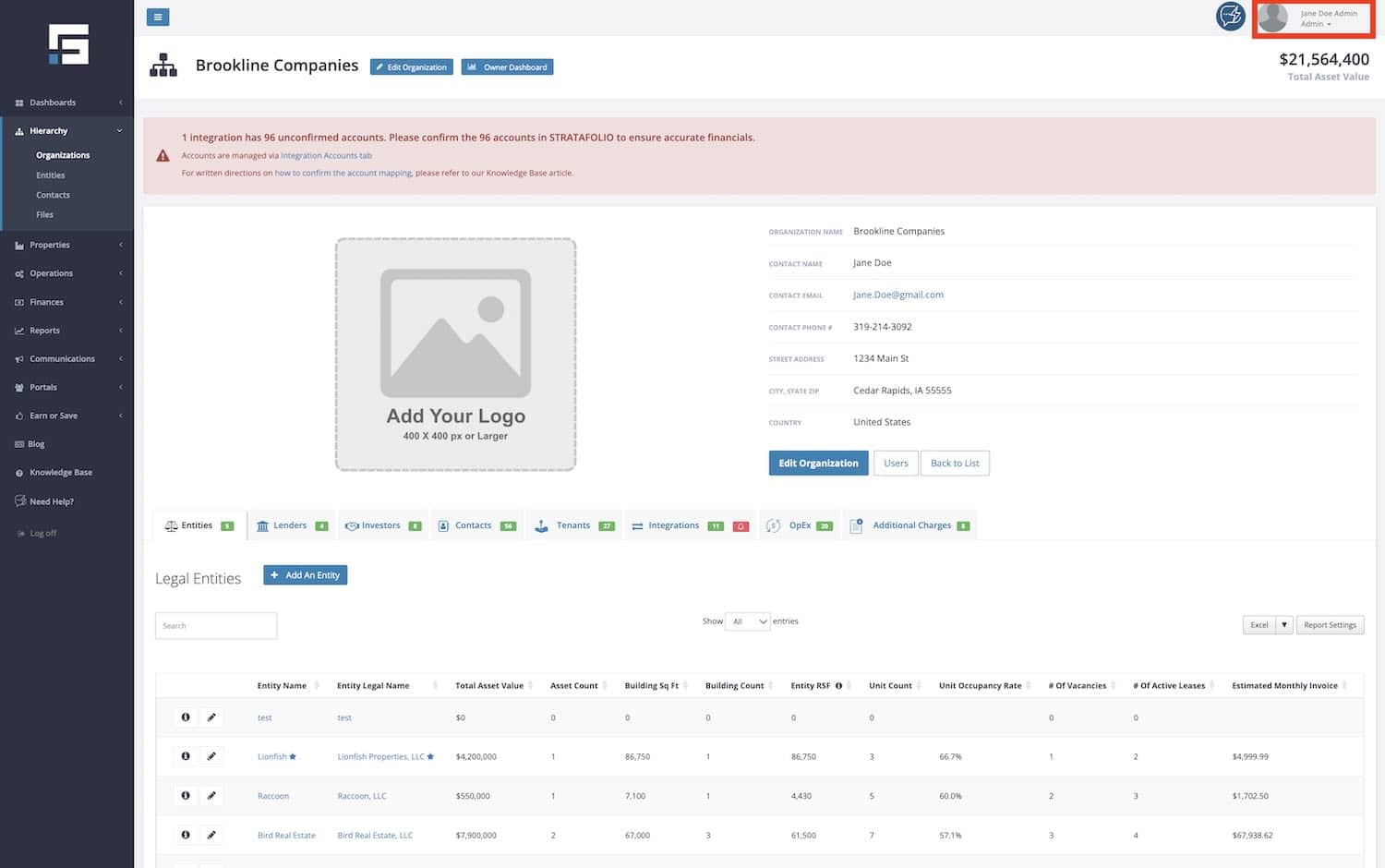
Select your Profile in the upper right corner of STRATAFOLIO.
Open the Alert Settings tab.

Toggle each alert On or Off for the categories you want. Select Save Changes.
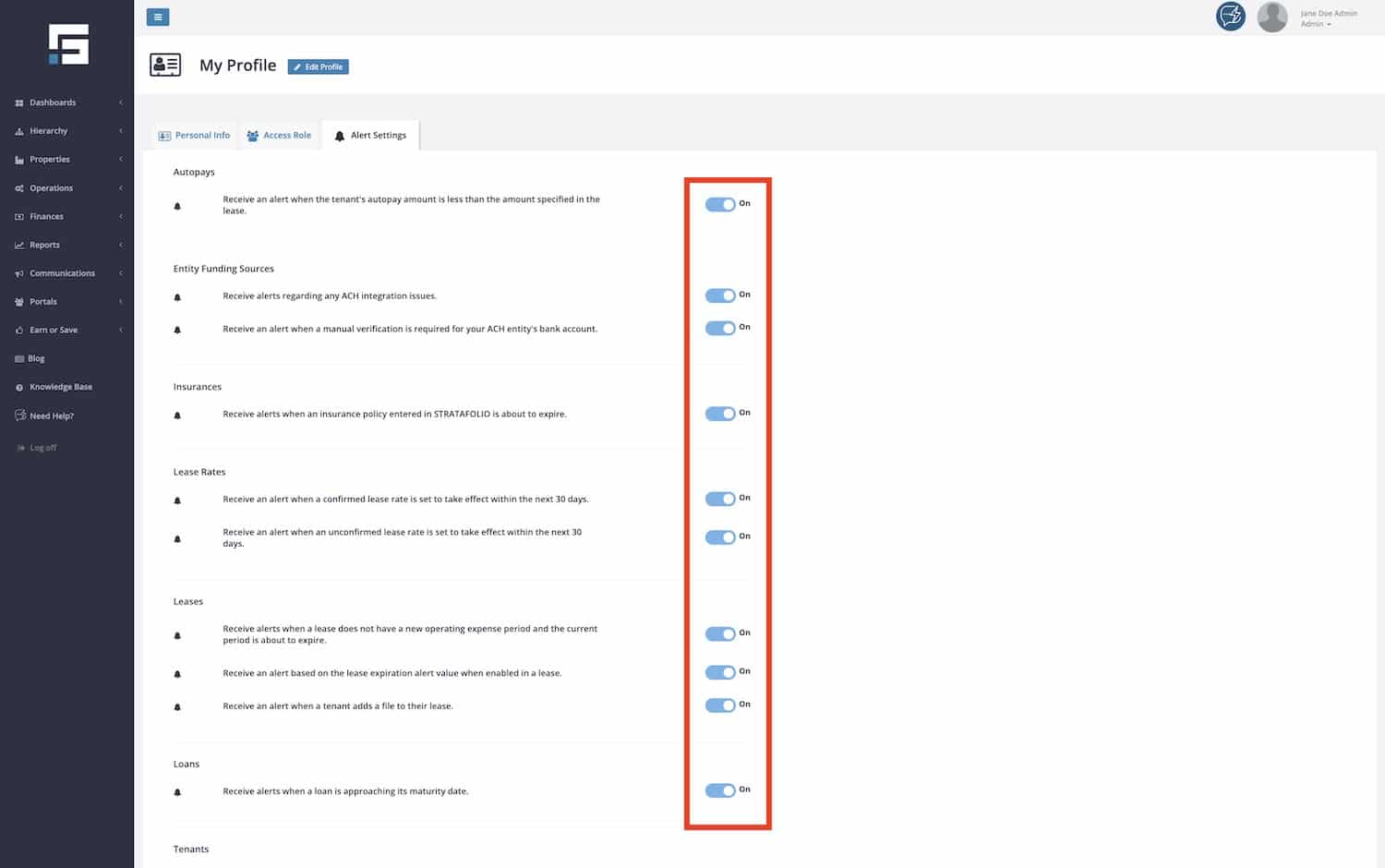
You can turn alerts on or off one at a time, or use the Edit Alerts button at the bottom of the page to update them together. The categories you will see include Autopays, Entity Funding Sources, Insurances, Lease Rates & Leases, Loans, and Tenants.
The Most Important Alerts to Watch
Every alert has value, but a few protect you from the largest financial and compliance risks. If you enable nothing else, enable these.
- Insurance Policy (COI) Expiration alerts help you avoid coverage gaps. A lapsed tenant policy can create real liability for the owner, so this alert is one of the most important to keep on.
- Lease Expiration and Renewal alerts protect your income. They give you time to start renewal conversations before a lease ends and a unit sits empty.
- Loan Maturity alerts give you room to plan. A maturing loan may need a payoff or a refinance, and these decisions take time to arrange.
- Missing Operating Expense Period alerts protect your billing. If a lease has no current operating expense period, you can lose the ability to invoice and recover those expenses on time.
- Lease Rate Escalation alerts protect scheduled rent increases. They remind you when a new rate is about to take effect so you can confirm it and invoice the correct amount.
- Autopay Amount alerts protect your cash collection. They tell you when a tenant is set to pay less than their lease requires, so you can correct it before the shortfall repeats.
Quick Reference: All Alerts at a Glance
Use this table as a fast summary of each alert, what it means, who receives it, and when STRATAFOLIO sends it.
| Alert Name | What It Means | Who Receives It | When STRATAFOLIO Sends It |
|---|---|---|---|
| Lease Expiration and Renewal Alert | A lease is approaching its end date and may need renewal or action. | Admin, Manager, Property Manager, Reader | The number of days before the end date that you set on the lease. |
| Lease Rate Escalation Alert (Unconfirmed) | A new lease rate is scheduled to take effect soon and has not been confirmed yet. | Admin, Manager, Property Manager, Reader | 30 days before the new rate takes effect. |
| Lease Rate Escalation Alert (Confirmed) | A confirmed new lease rate is scheduled to take effect soon. | Admin, Manager, Property Manager, Reader | 30 days before the new rate takes effect. |
| Loan Maturity Alert | A loan is approaching its maturity date and may need a payoff or refinance decision. | Admin, Manager, Reader | 90 days, 60 days, and 30 days before the maturity date. |
| Insurance Policy (COI) Expiration Alert | A Certificate of Insurance on file is about to expire or has expired. | Admin, Manager, Property Manager, Reader, and Tenant contacts | 30 days before, 7 days before, on the expiration date, then 3 days and 7 days after. |
| Missing Operating Expense Period Alert | A lease is missing a new operating expense period and the current period is about to end. | Admin, Manager, Property Manager, Reader | 60 days, 30 days, 15 days, and 1 day before the period ends, and again 7 days after if still missing. |
| Autopay Amount Below Lease Amount (Landlord) | A tenant’s scheduled autopay is less than the amount their lease requires. | Admin, Manager, Property Manager, Reader | On the autopay date and again 7 days after. |
| Autopay Amount Below Lease Amount (Tenant) | Your scheduled autopay is less than the amount your lease requires. | Tenant | 1 day before, on the autopay date, and 1, 3, 7, and 14 days after. |
| Bank Account Verification Needed | A bank account added for ACH needs manual verification before it can be used. | Admin, Manager, Reader (entity) and Tenant (tenant account) | Several reminders over about 10 days while verification is pending. |
| Bank Connection Needs Attention | There is an issue with a connected bank account used for ACH. | Admin, Manager, Reader (entity) and Tenant (tenant account) | The day the issue is detected. |
| Bank Connection About to Expire | A connected bank account is about to expire and needs to be reconnected. | Admin, Manager, Reader (entity) and Tenant (tenant account) | As soon as the connection is flagged as expiring. |
| Tenant Uploaded a New COI | A tenant added a new Certificate of Insurance through the Tenant Portal. | Admin, Manager, Property Manager, Reader | Right away when the tenant uploads it. |
| Tenant Created or Updated a Work Order | A tenant submitted or changed a work order through the Tenant Portal. | Admin, Manager, Property Manager, Reader | Right away when the tenant takes the action. |
| Tenant Uploaded a File | A tenant added a file to their portal or to a lease. | Admin, Manager, Property Manager, Reader | Right away when the tenant uploads the file. |
Lease Expiration and Renewal Alerts
This alert tells you when a lease is approaching its end date and may need renewal. It gives your team time to reach out to the tenant, prepare paperwork, or plan for a vacancy.
STRATAFOLIO sends this alert based on the number of days you choose on each lease. To receive it, turn the setting on in two places. First, set the expiring lease alert to On in your Alert Settings tab. Second, open the lease, set Enable Lease Expiration Alert to Yes, and enter the number of days in the Lease Expiration Alert (Days Prior) field. The email then arrives that many days before the lease ends. For full setup steps, see How Lease Alerts Work.
Lease Rate Escalation Alerts
This alert tells you when a scheduled rent increase is about to take effect. It comes in two forms. The unconfirmed version reminds you when a new rate is coming but has not been confirmed yet. The confirmed version reminds you when a confirmed rate is about to begin.
STRATAFOLIO sends both alerts 30 days before the new rate takes effect. Use this window to confirm the rate and make sure your next invoice reflects the correct amount. If you leave a rate unconfirmed, the reminder gives you time to review it before it goes live.
Loan Maturity Alerts
This alert tells you when a loan is approaching its maturity date. A maturing loan often requires a payoff, a renewal, or a refinance, and each of those takes planning.
STRATAFOLIO sends this alert 90 days, 60 days, and 30 days before the maturity date. The staggered timing gives you several reminders so a maturity date never surprises you.
Insurance Policy (COI) Expiration Alerts
This alert tells you when a Certificate of Insurance on file is about to expire or has already expired. Keeping current coverage on file protects the owner from liability if a tenant lets a policy lapse.
STRATAFOLIO sends a series of email alerts for an expiring policy until you update the policy or the lease ends. The emails arrive 30 days before expiration, 7 days before, on the expiration date, then 3 days after, and 7 days after. Depending on your setup, these alerts can reach your landlord team, the tenant contacts, and the insurance agent. To learn how to add and update coverage, see How to Add, Track, and Manage Tenant COIs.
Missing Operating Expense Period Alerts
This is one of the most useful alerts for anyone who invoices operating expenses or CAM. It tells you when a lease does not have a new operating expense period and the current period is about to end. Without a current period, you cannot invoice those expenses for the next term, which can delay your CAM recovery.
STRATAFOLIO sends this alert 60 days, 30 days, 15 days, and 1 day before the current period ends, and again 7 days after the period ends if the lease is still missing a new period. This alert applies only to a lease that is linked to your accounting integration.
How to Open the Correct Lease From the Email Link
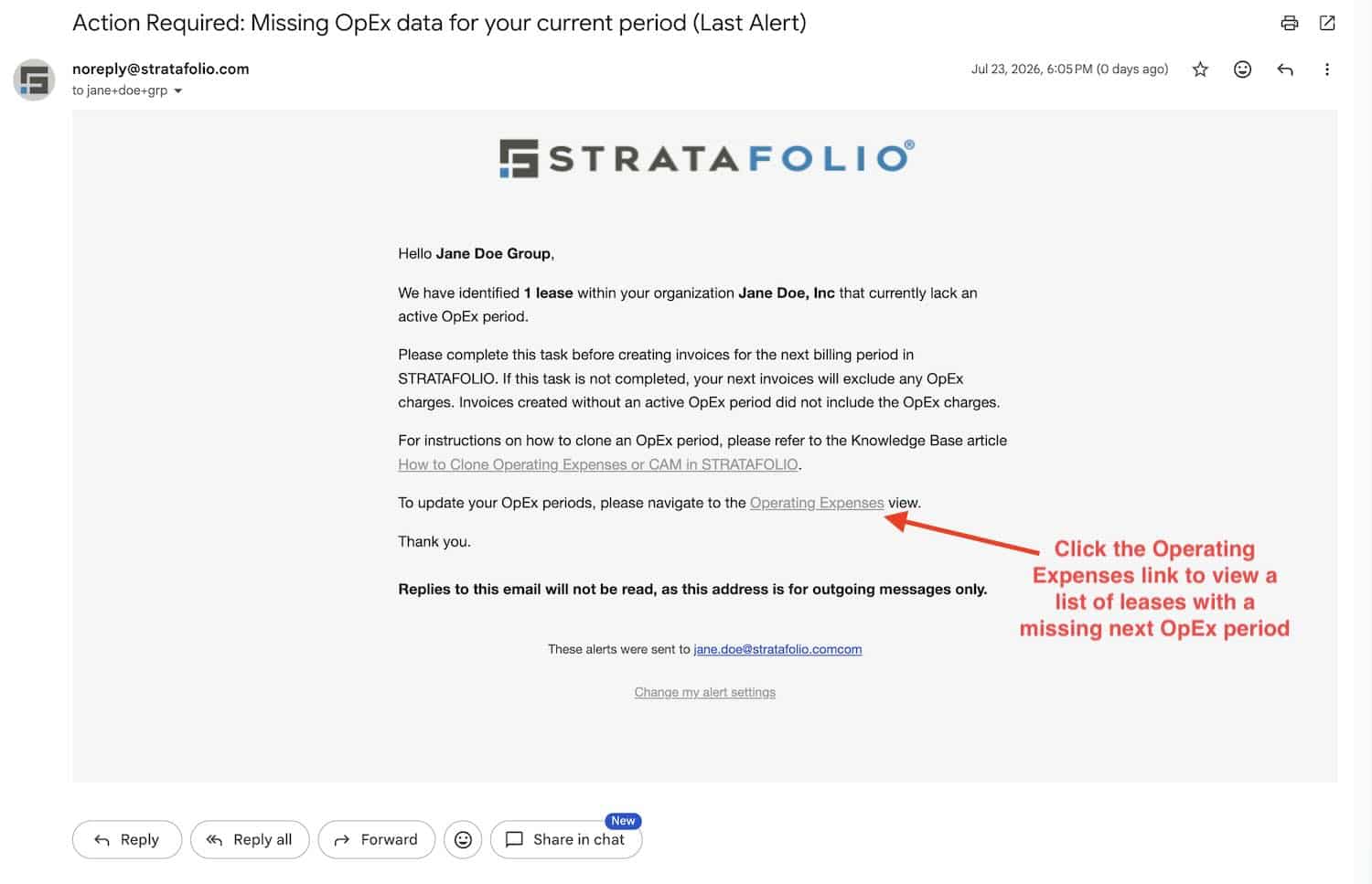
The alert email includes a link into STRATAFOLIO. Selecting the Operating Expense link in the email takes you to the Operating Expenses index view with the filter for Leases missing an OpEx period automatically applied. Select the OpEx End Date column header on the table to sort the leases and easily locate the affected lease.
If you are still unable to follow the instructions above, here is a breakdown:
- Open the Missing OpEx Period alert in your email.
- Click the Operating Expense link inside the alert.
- STRATAFOLIO opens the Operating Expenses index page. The OPEX STATUS dropdown filter is already set to Missing Next OpEx Period, so the table shows only the leases that need a new period.
- Click the OpEx End Date column header to sort the end dates. Click once to sort in ascending order, and click again to sort in descending order.
- Use the sorted list to locate the lease with the missing OpEx period, then open that lease to add the next period.
Once you have located the affected lease, select the ellipsis on the far left of that row.
Select View OpEx to open the OpEx tab for that lease.
Select Add an Operating Expense Period, then enter the Operating Expense Start Date and Operating Expense End Date for the new term. Many owners use the calendar year, such as 1/1 through 12/31, to match standard CAM reconciliation.
Once you add and confirm the new period, the lease is ready for invoicing again and the alert stops.
Autopay Amount Alerts
This alert tells you when a tenant’s scheduled autopay is less than the amount their lease requires. Catching a shortfall early keeps your collections accurate and avoids a repeating gap.
There are two versions. The landlord version notifies your team on the autopay date and again 7 days after. The tenant version notifies the tenant 1 day before the autopay date, on the day itself, and again 1, 3, 7, and 14 days after, so they have several chances to correct the amount.
ACH and Bank Account Alerts
These alerts keep your ACH payments running smoothly by flagging anything that needs attention on a connected bank account. They apply both to the owner or entity bank accounts and to tenant bank accounts.
You may see a Bank Account Verification Needed alert when a newly added account still needs manual verification. STRATAFOLIO sends reminders over about ten days while verification is pending. You may see a Bank Connection Needs Attention alert on the day an issue is detected with a connected account. You may also see a Bank Connection About to Expire alert when a connection is flagged as expiring and needs to be reconnected. Acting on these quickly prevents a payment from failing.
Tenant Portal Activity Alerts
These alerts keep your team aware of what tenants do in the Tenant Portal, so nothing waits unseen. STRATAFOLIO sends them right away when the tenant takes the action.
You receive an alert when a tenant uploads a new Certificate of Insurance, when a tenant creates or updates a work order, and when a tenant uploads a file to their portal or to a lease. These alerts help your team respond to insurance updates, maintenance requests, and shared documents without delay.
Best Practices and Tips When It Comes to STRATAFOLIO Alerts and Notifications
- Keep insurance, lease, loan, and operating expense alerts turned on. These protect you from the largest financial and compliance risks, and the reminders arrive early enough to act.
- Set a realistic renewal window on each lease. Enter enough days in the Lease Expiration Alert (Days Prior) field to give your team time to prepare, not just a few days of notice.
- Encourage tenants to use the Tenant Portal. Tenants with portal access can manage their own alerts, upload their own COIs, and correct autopay issues, which reduces follow up work for your team.
- Act on the first alert, not the last. Most alerts repeat on a schedule. Handling the first reminder keeps small issues from turning into missed deadlines.
- Review your Alert Settings after adding team members. Confirm that the right people have the right alerts enabled so coverage does not depend on one person.
Troubleshooting STRATAFOLIO Alerts and Notifications
- You are not receiving an alert you expected: Open your Profile, then the Alert Settings tab, and confirm the alert is toggled On. Then confirm your access role can receive that alert.
- You enabled lease alerts but still get no lease expiration email: The global setting is only the first step. Open the lease, set Enable Lease Expiration Alert to Yes, and enter a number in the Lease Expiration Alert (Days Prior) field.
- You are not receiving the Missing Operating Expense Period alert: This alert only applies to a lease that is linked to your accounting integration. Confirm the lease is linked, then confirm the alert is on in your settings.
- A tenant says they never get their alerts: Confirm the tenant has Tenant Portal access and a valid email address on their contact record. Without portal access, the tenant cannot receive or manage their own alerts, though your landlord team still will.
- You keep getting an insurance alert after updating coverage. The insurance alerts repeat until the policy on file is updated or the lease ends. Confirm the new Certificate of Insurance is uploaded and the policy dates are current.